
Blog
Rights-aware video cleanup, localization, and responsible AI editing guides
Latest video cleanup guides
Practical tutorials for preparing authorized videos before publishing, localization, or reuse.
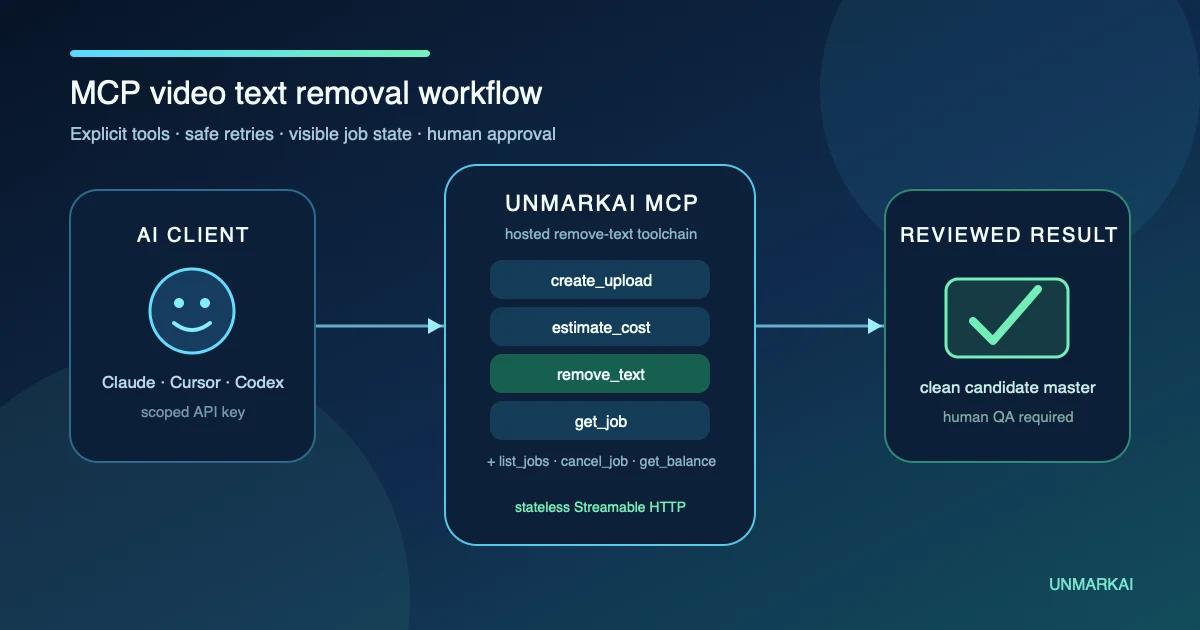
How to Remove Text from Video with an MCP Server
Give an MCP-capable AI agent a controlled seven-tool workflow for removing authorized hardcoded text from video without building an API client.

How to Remove Moving Objects from Video With AI Tracking
Remove a moving object from video by tracking its mask across each shot, reconstructing the hidden background with temporal context, and checking motion frame by frame.

Why AI Video Text Removal Flickers—and How to Fix It
AI video text removal flickers when masks, tracking, or reconstructed backgrounds change between frames. Diagnose ghosting, wobble, and blur, then fix the workflow.

Can VLC, HandBrake, CapCut, or AI Remove Hardcoded Subtitles?
VLC and HandBrake can remove or disable soft subtitle tracks, but not text burned into video pixels. Compare CapCut, AI inpainting, crop, and clean-master workflows.

How to Remove Subtitles from AI Short Dramas and Videos
Learn how to remove hardcoded subtitles from AI short dramas and regular videos. AI-powered inpainting erases burned-in text without cropping or quality loss.
Core cleanup resources
Use these hub and money pages when you need the product workflow instead of a tutorial.
AI video cleanup hub
Choose the right workflow for caption replacement, ordinary scene cleanup, translation, and responsible AI post-production.
Responsible AI video post-production
Polish authorized AI footage while preserving attribution, source identification, and provenance.
Update captions and owned text
Update authorized hardcoded captions, lower thirds, owned campaign copy, and temporary review text.
Ready to prepare an authorized source master?
Choose a rights-aware cleanup or localization workflow for content you are authorized to edit.
Get 10 points on sign up · No credit card required