
AI Instagram Watermark Remover

Remove Instagram Watermark from Reels Online - No Blur

Upload your video

Drag & drop a file here, or click to browse

Videos are processed securely and never shared

MP4, MOV, AVI, MKV, WebM · Up to 2GB

See the difference

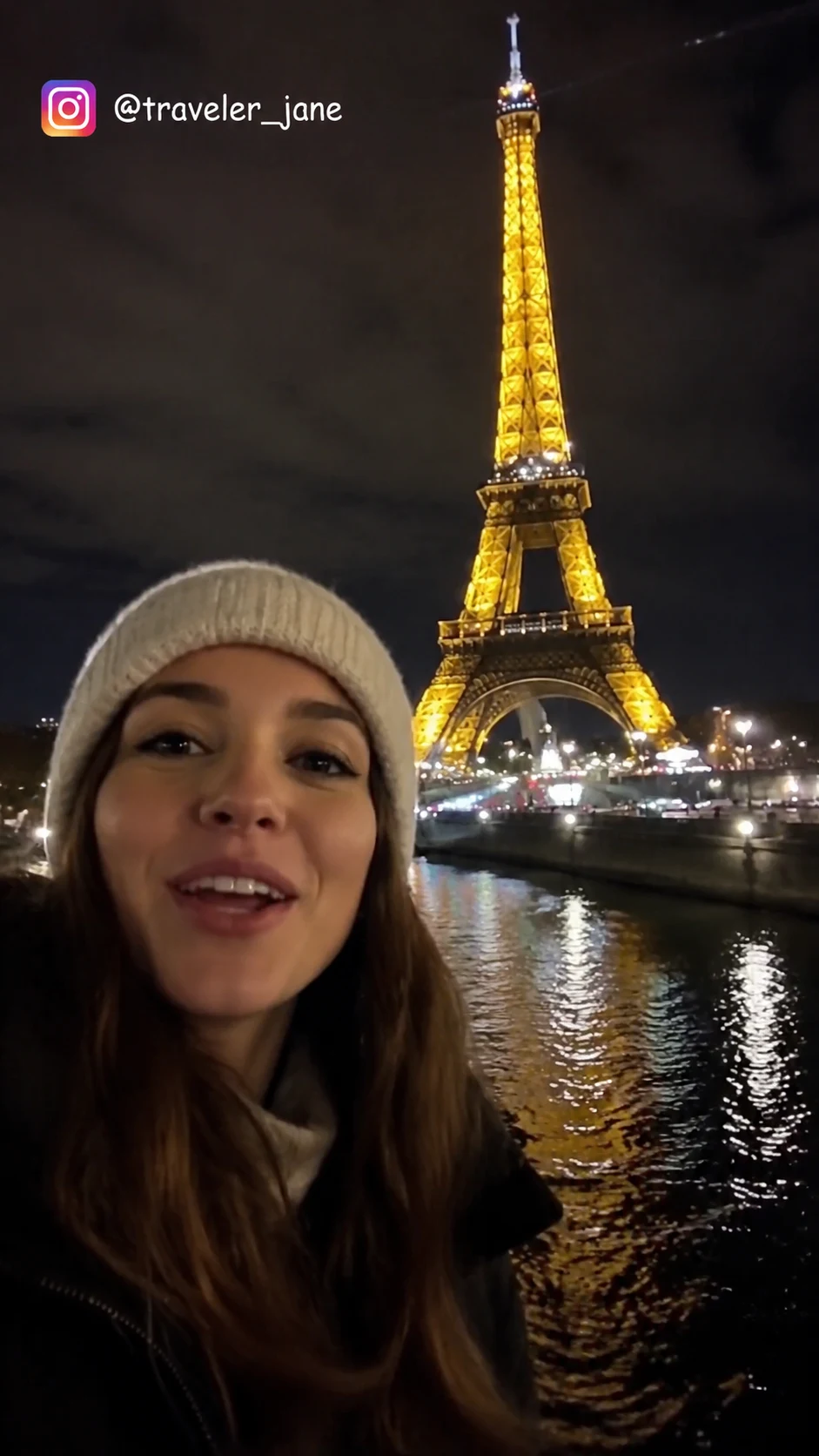
BeforeInstagram Reels video with a visible Instagram logo and username watermark before AI removal - UnmarkAI
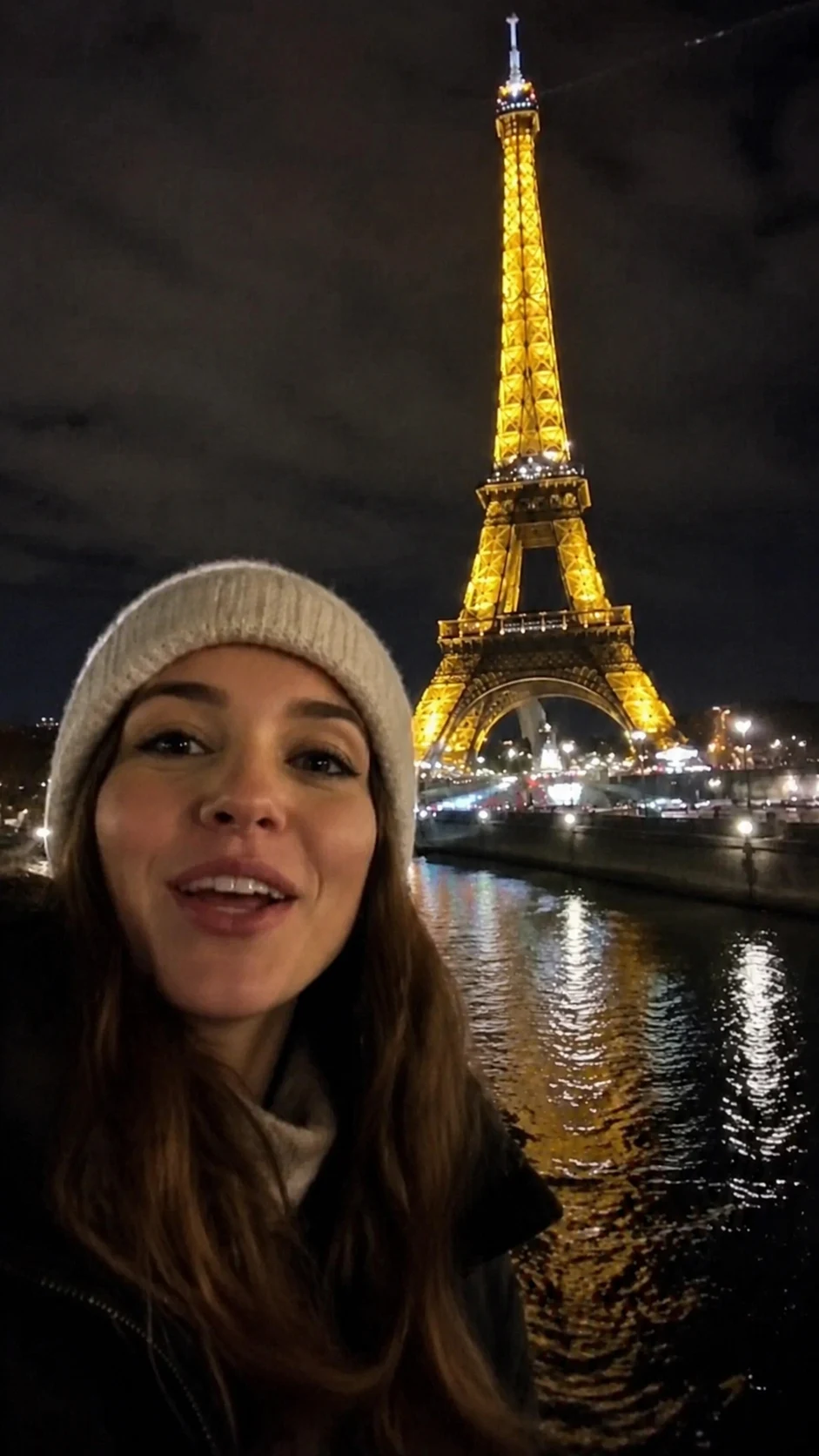
AfterInstagram Reels video after AI Instagram watermark removal - UnmarkAI

Remove Instagram Reels watermarks and username overlays from videos you own or are authorized to edit. AI detects and erases the Instagram logo and handle, keeping your original resolution and framing intact for cross-platform sharing.

UnmarkAI is an online Instagram watermark remover powered by AI inpainting. Upload your Reels or videos, let AI find the Instagram logo and username, then preview and download a clean export for TikTok, Shorts, or other platforms.

What is Instagram Reels watermark removal?

Instagram Reels watermark removal is the process of cleaning the Instagram logo, Reels mark, username, or handle overlay from a saved Reel or video you own or are authorized to edit. UnmarkAI uses AI inpainting to erase the visible mark and reconstruct the hidden background without cropping the vertical frame or adding a blur patch.


What Instagram logos, usernames, and handles can authorized creators remove?

Authorized creators can remove Instagram logos, Reels marks, usernames, @handles, account labels, repost indicators, and temporary review marks from original, licensed, team-owned, or client-approved videos. The cleaned export can be reused for TikTok, Shorts, ads, localization, or brand delivery when the creator has rights to modify the clip.

Understanding Instagram watermarks

Instagram adds a watermark and your username to downloaded Reels. This is a "burned-in" overlay that becomes part of the video pixels. Because it covers original detail, simple filters cannot remove it — AI inpainting is required to reconstruct the missing background.

Reels Logo and Platform Mark

Remove burned-in Instagram and Reels logos from authorized vertical clips and creator exports.

Username and Handle Overlay

Clean creator usernames, @handles, account labels, and repost indicators from files you control.

Hard-to-Crop Placement

Instagram marks often sit where cropping would damage faces, captions, products, or the vertical composition.

AI Background Reconstruction

AI rebuilds the covered pixels using surrounding texture, color, lighting, and motion context.

How to remove Instagram watermark from Reels?

Clean your Instagram Reels by uploading the video you own, letting AI detect the logo and username overlay, then previewing and downloading the watermark-free clip.

01

Upload your Instagram video

Start with an Instagram Reel or video you own or have permission to edit. Upload the file directly from your device — no login or app installation required.

02

AI detects and removes the watermark

AI scans the video, identifies the Instagram logo and username overlay, and reconstructs the background pixels using surrounding data. This preserves the original frame without blurring.

03

Preview and download

Compare the cleaned video against the original, check the edges where the mark was, and download your watermark-free export at high quality.

Instagram watermark removal results

See how AI inpainting removes the Instagram Reels logo and username without cropping the vertical frame or leaving a smudge.

  • No visible blurAI fills the watermark area with realistic background pixels instead of a simple blur.
  • Perfect for ReelsKeep the full 9:16 vertical frame intact when moving content between platforms.
  • Removes usernamesThe handle overlay is erased completely, leaving a clean master of your own content.
BeforeInstagram Reels logo - before
AfterInstagram Reels logo - after
Ready for a cleaner clip?AI-powered, no blur, no quality drop.
Start free
BeforeInstagram handle overlay - before
AfterInstagram handle overlay - after
Ready for a cleaner clip?AI-powered, no blur, no quality drop.
Start free

Authorized use for creators

Instagram watermark removal is designed for creators who need to repurpose their own content. Always ensure you have the rights to the media before removing any platform marks.

  • Own content onlyVideos you filmed and uploaded to Instagram where you need a clean master.
  • Cross-platform reusePreparing your Reels for TikTok or Shorts without showing the original platform brand.
  • Client approvalsWorking on social media campaigns where the client has authorized watermark removal.
  • Draft cleanupRemoving draft text or temporary marks from your own creative projects.

Supported Instagram video formats

UnmarkAI supports common video formats used for Instagram exports, including MP4 and MOV. It handles vertical 9:16 Reels as well as standard 1:1 or 4:5 feed videos.

Reels and Feed Ratios

Clean 9:16 Reels, square 1:1 clips, 4:5 feed videos, and other Instagram creator exports.

Common Video Files

Upload MP4, MOV, AVI, MKV, or WebM files from your device or approved delivery folder.

HD and 4K Sources

Use high-resolution sources when available so AI has more detail to restore the watermark area.

Quality-Conscious Cleanup

The workflow preserves the frame and avoids crop or blur methods that visibly degrade the export.

Remove Instagram watermark for TikTok and Shorts

Many creators post their Reels to TikTok or YouTube Shorts. To avoid platform-specific penalties, it is best to remove the Instagram logo first. UnmarkAI lets you clean your own clips in bulk without manual masking.

Cross-Platform Sharing

Prepare owned or authorized Reels for TikTok, YouTube Shorts, Facebook Reels, ads, and campaign libraries.

Platform-Neutral Masters

Reduce Instagram-specific logos before adding fresh captions, hooks, or creative for another channel.

Cleaner Brand Presentation

Keep the focus on the creator, product, or story rather than an old platform mark.

Online Batch Workflow

Clean multiple authorized Reels in the browser without manual masking or a desktop editing setup.

Is it legal to remove Instagram watermarks?

You should only remove watermarks from videos where you own the copyright or have explicit permission from the owner. Removing watermarks to misappropriate or re-upload others' content is a violation of copyright and platform terms.

Original Reels

Use Instagram watermark cleanup on Reels and videos you created, uploaded, and control.

Authorized Third-Party Clips

Only process client, brand, or partner files when you have explicit permission to edit them.

No Unauthorized Reuploads

Do not use cleanup to impersonate another creator or remove attribution from content you do not own.

Platform Compliance

Respect Instagram rules, copyright, contracts, and destination-platform requirements before publishing.

Why choose AI for Instagram logo removal?

Old methods like cropping or blurring ruin the video. Cropping changes your composition, and blurring leaves an ugly smudge. AI inpainting looks at the surrounding frames to "guess" what was behind the logo, resulting in a seamless finish.

Full Vertical Frame

Preserve the 9:16 Reels composition instead of cutting away captions, products, or faces.

No Censored Look

Avoid the obvious blur or mosaic patch that makes the old logo location stand out.

Pixel Reconstruction

AI uses nearby frames and surrounding pixels to rebuild the area behind the logo or handle.

Mark Tracking

Static and lightly moving usernames or platform marks can be tracked across frames automatically.

Trust

Built for authorized video cleanup

UnmarkAI is designed for creators and teams working with content they own, license, or have permission to edit. The product copy, terms, and upload flow all reinforce that boundary.

Rights-aware workflow

Designed to help you clean videos you own, license, or are explicitly authorized to edit.

Preview before download

Check the AI reconstruction frame-by-frame before exporting the final clean video.

Secure processing

Your uploads and exports are processed securely and never shared with third parties.

Clear acceptable use policy

Strict guidelines against removing attributions from unauthorized third-party content.

Frequently asked questions

Practical answers for safe, high-quality cleanup workflows.

How do I remove the Instagram watermark from my Reels?

Upload your Reel to UnmarkAI, let the AI scan for the logo and username, and click process. You can then preview the result and download a clean, watermark-free version of your video.

Can I remove the Instagram username from a video?

Yes. AI inpainting can detect and remove both the Instagram logo and the creator handle overlay that appears on downloaded Reels.

Is there a free Instagram watermark remover online?

UnmarkAI offers an online AI-powered tool to remove Instagram watermarks. You can preview the results for free before downloading.

Does removing the watermark affect video quality?

No. AI inpainting reconstructs only the pixels covered by the watermark, leaving the rest of the frame at its original resolution and quality.

Is it legal to remove Instagram watermarks?

It is legal if you own the video or have permission from the creator. Removing watermarks from content you do not own for unauthorized distribution is not permitted under Instagram's Terms of Use.

Ready to clean your videos?

Join thousands of creators who use UnmarkAI to deliver distraction-free content.

Start for Free Now

Get 10 credits on sign up · No credit card required